
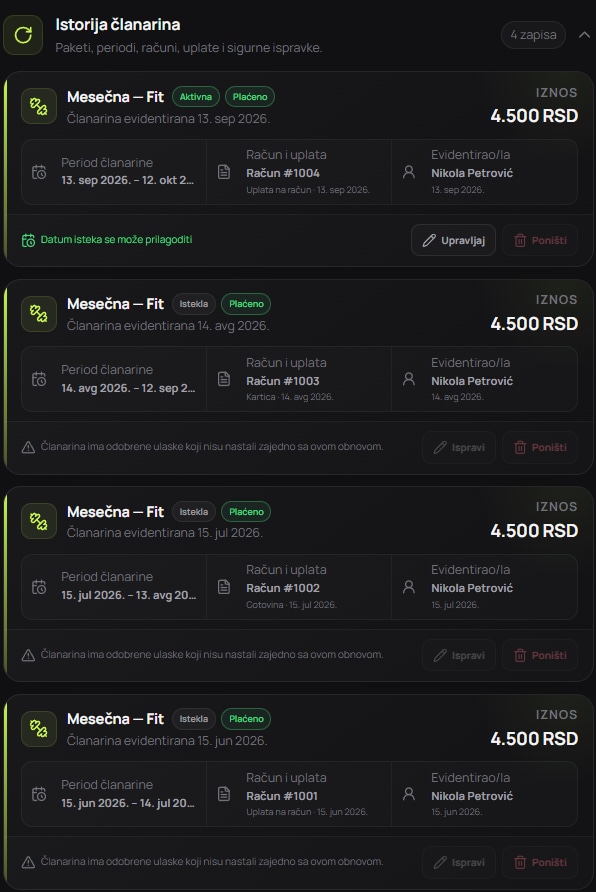
Screenshots show the Serbian version of the app.
The data model before the screen
A profile describes the member, a membership describes rights over a period, and a payment is a financial event. Combining these in one cell overwrites old status on renewal, obscures partial payments and leaves reports unable to explain differences.
Before setup, list required fields, their source and who maintains them. Minimise contact and additional data. Every field needs a purpose, format and a rule for missing values.
Statuses and business rules
Membership status should follow dates, the plan and approved exceptions. A payment alone does not make access active if the plan has not started or access is restricted. Likewise, do not manually change expired status without a record explaining an extension.
Freezes, cancellations and trial entry need defined start and end dates and an authorised person. Notes can add context but should not be the only place where entry eligibility is recorded.
| Record | Required minimum | Typical check | Avoid |
|---|---|---|---|
| Member | Identity and approved contact details | Duplicate check before creation | A new profile for every renewal |
| Membership | Plan, start, end, status | End is not before start | Overwrite historical periods |
| Payment | Amount, date, method, link | Daily total | Record only ‘paid’ |
| Correction | Who, when, reason | Audit trail and approval | Delete without a trace |
Daily reception work
At the start of a shift, review open exceptions and escalation routes. For a new membership, reception selects the existing profile, confirms the plan and period, records payment and checks the result. Report discrepancies instead of bypassing them with an improvised note.
At day end, reconcile recorded payments with actual collection channels, failed entries with explanations and manual corrections with approvals. A short daily procedure prevents small discrepancies becoming unexplained monthly problems.
Renewals, freezes and outstanding balances
Renewal creates a new period or clearly extends the existing one according to rules, preserving history. A future membership should not turn an old payment into a new one. Record the period and basis of a freeze and test the resulting status at boundary dates.
Distinguish debt from an unpaid offer or incorrectly recorded payment. Financial and tax treatment depends on the business and local rules, so the responsible accountant confirms the configuration. Operational software does not replace statutory accounting or fiscalisation requirements.
Permissions, auditing and exports
Not every employee should edit historical payments, export the full database or change system rules. Roles follow tasks, individual accounts link actions to people and audit records allow review. Periodically review active accounts and administrators.
A CSV or other export leaves the app's controls. Define its purpose, minimum columns, approved storage and deletion deadline. Sending a full database to private email for one check creates unnecessary risk.
Weekly and monthly quality checks
Weekly, check duplicates, illogical membership dates, payments without a linked membership and unusual manual correction counts. Monthly, compare totals by payment method, renewals using a consistent definition and unresolved exceptions.
Undefined metrics create false precision. Document whether ‘active member’ means an active membership on the last day, at any point in the month or at least one visit. Use the same definition across periods.
Moving away from parallel spreadsheets
Once the new records are verified, set a date after which they are the only place for entry. The old spreadsheet may remain read-only for a limited time, but new rows must not be added to both systems.
If staff lack a report, address it through a request or approved export rather than permanently restoring a parallel database. The owner tracks adoption by shift and resolves why staff bypass the process.